Server-side sorting and filtering for a React data grid, and five places your SQL quietly disagrees
A grid on a million rows in PostgreSQL asks the server for 100 rows at a time. The usual hand-written endpoint shows lines twice, drops 243,007 rows from a "not equal" filter and finds nothing for "heart". Measured on 1,067,371 real invoice lines, with the indexes that make the correct version fast.
 KanuniLabs11 min read
When the data is too big for the browser, or some users may only see some of it, the grid stops sorting and filtering in the browser. It sends your server the sort, the filters and the search, asks for 100 rows at a time and shows what comes back. The browser then has no way to know whether those 100 rows are right.
The endpoint behind it is usually written in an afternoon: turn the request into WHERE, ORDER BY, LIMIT and OFFSET, run it, return the rows and a count. This post runs that version against a real table and compares it with what the grid would have shown with the data in the browser. The data is the 1,067,371 invoice lines of Online Retail II, a UK online gift shop's sales from December 2009 to December 2011, loaded into PostgreSQL 16 on a laptop. 243,007 of those lines have no customer number, and that turns out to matter.
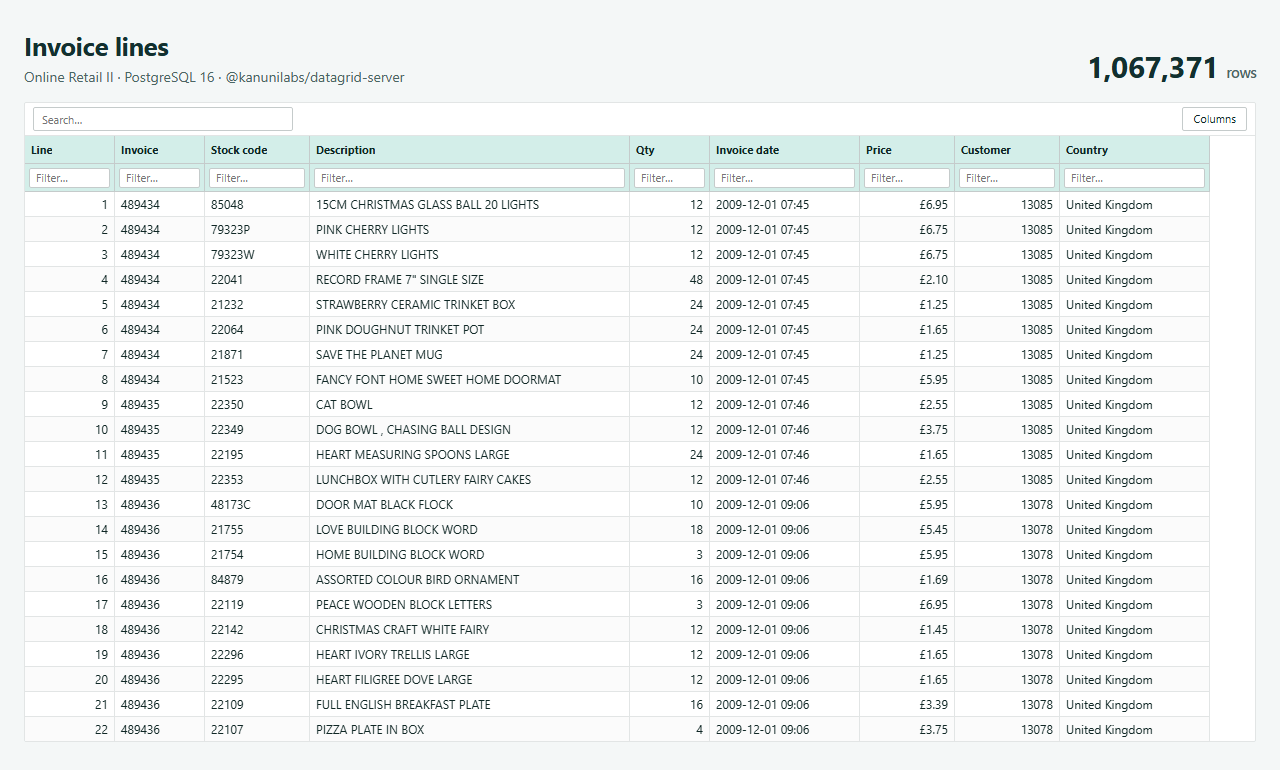
The grid is our free DataGrid for React with its REST data source. The screenshots use the Teal colour scheme with the Ledger structure, both from the Theme Builder. The server half is @kanunilabs/datagrid-server, which is also free. The sections below go through five ways the usual endpoint goes wrong, then what the correct version costs and the indexes that pay it back. An earlier post covers the browser half: what the grid sends and why.
The page and the usual endpoint
On the page, the grid gets a URL instead of an array:
import { DataGrid, createRestDataSource } from '@kanunilabs/datagrid-react';

const source = createRestDataSource({ url: '/api/invoices', distinctValues: true });

<DataGrid dataSource={source} rowKey="id" columns={columns} toolbar filterRow headerFilter style={{ height: 640 }} />;
Each request carries skip, take, and the sort and filter as JSON. This is the endpoint most of us would write first. Every value is a bound parameter, so it looks safe:
const where = [], params = [];
const p = (v) => (params.push(v), `$${params.length}`);
for (const f of filters) {
  if (f.operator === 'contains') where.push(`${COL[f.columnId]} LIKE '%' || ${p(f.value)} || '%'`);
  if (f.operator === '<>') where.push(`${COL[f.columnId]} <> ${p(f.value)}`);
  if (f.operator === '=') where.push(`${COL[f.columnId]} = ${p(f.value)}`);
}
const order = sort.map((s) => `${COL[s.columnId]} ${s.direction}`).join(', ');
const sql = `SELECT … FROM invoices ${where.length ? 'WHERE ' + where.join(' AND ') : ''}
             ${order ? 'ORDER BY ' + order : ''} LIMIT ${p(take)} OFFSET ${p(skip)}`;
1. Rows that appear twice while scrolling
Sort the grid by stock code and scroll. The same invoice line shows up again a few rows further down, and another line never shows up at all:
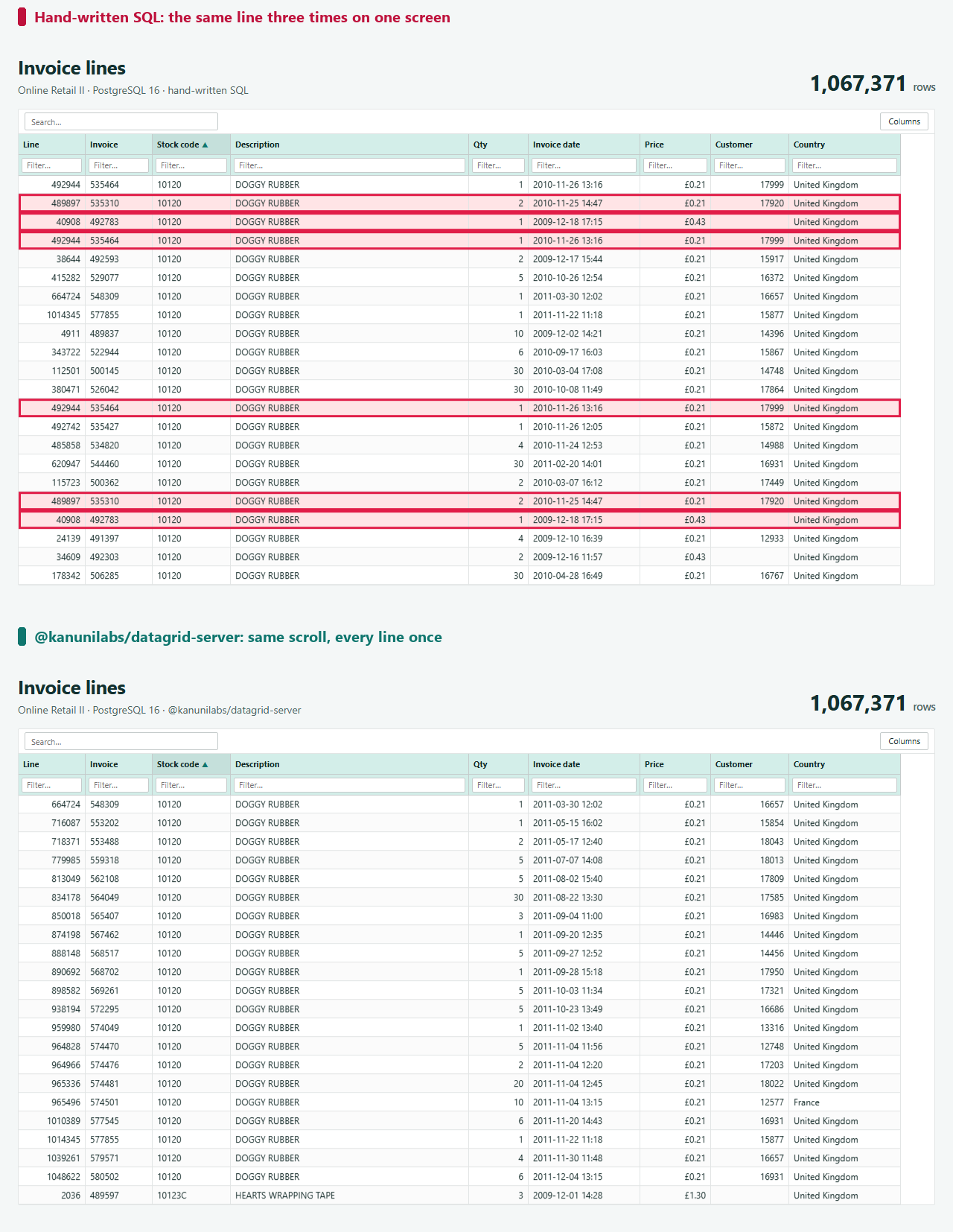
Thousands of lines share each stock code, and SQL does not promise any order among equal values. Every block of 100 is a separate query, and PostgreSQL is free to break the ties differently each time. We scrolled through the first 10,000 rows, which is 100 blocks. Sorted by stock code, about 2,250 lines appeared more than once, so at least 2,700 of the lines that belong there never appeared. Sorted by quantity it was about 2,100 and 2,650. The exact counts change from run to run, which is the problem. Sorted by country or by date there were none, because those columns had an index, and reading an index happens to return ties in the same order every time. That is why this passes testing on one column and fails on the next. With no sort at all, the endpoint has no ORDER BY, and the first page of the not-equal screenshot below begins at line 267,617.
The fix is one more sort term: end every ORDER BY with the row's unique key, here id. The package adds it to every query once you give it the key.
2. "Not equal" drops the empty cells
Filter the Customer column to <>17841. The grid should hide that one customer's lines. The hand-written endpoint hides 243,007 more:
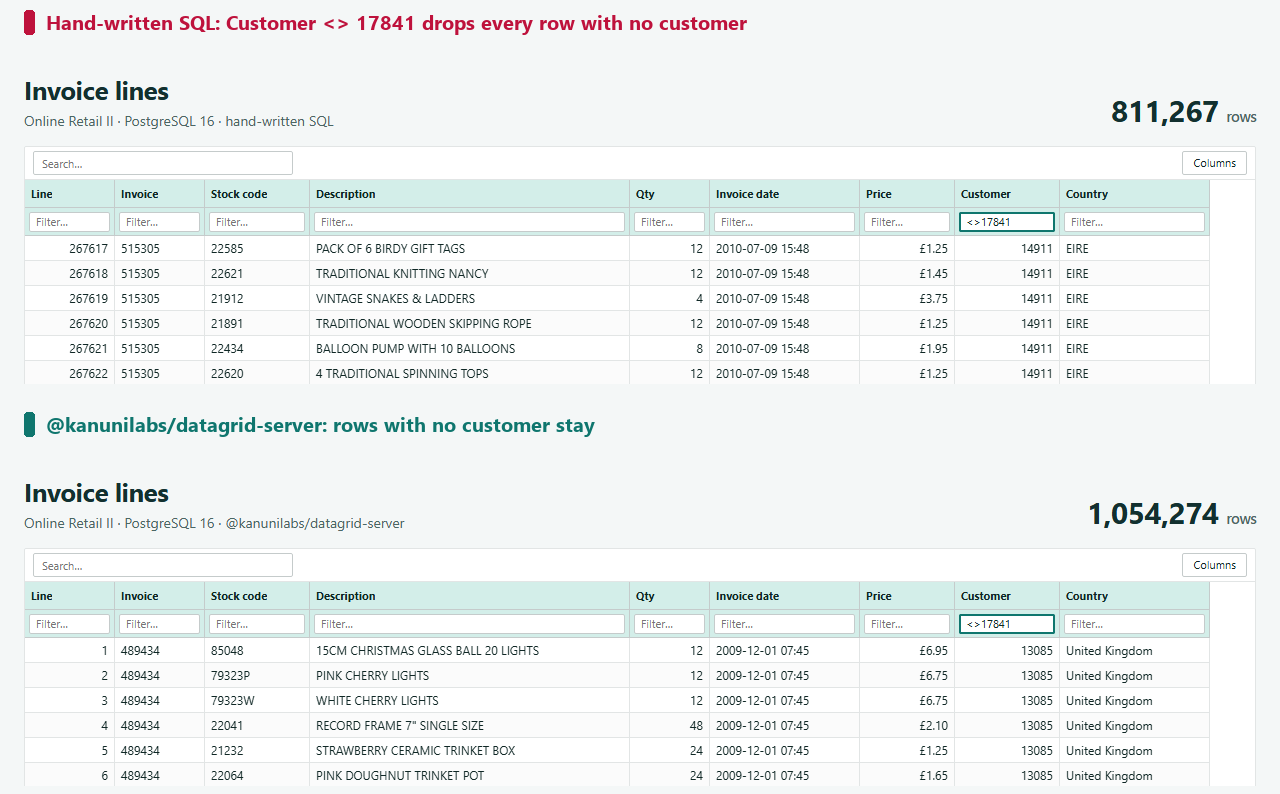
In SQL, NULL <> 17841 is neither true nor false, so WHERE drops every line without a customer number. To the person using the grid, an empty cell is not equal to 17841, and that line should stay. The package writes (customer_id IS NULL OR customer_id <> $1), and = 0 does not match empty cells either.
3. Empty values first
Sort by customer, highest first. PostgreSQL puts NULL values first in descending order and last in ascending order, so the first 243,007 rows of the "highest customer" view have no customer at all. That is 2,430 full blocks of blank cells before the first number. MySQL and SQLite do the opposite, so the same endpoint behaves differently on another database.
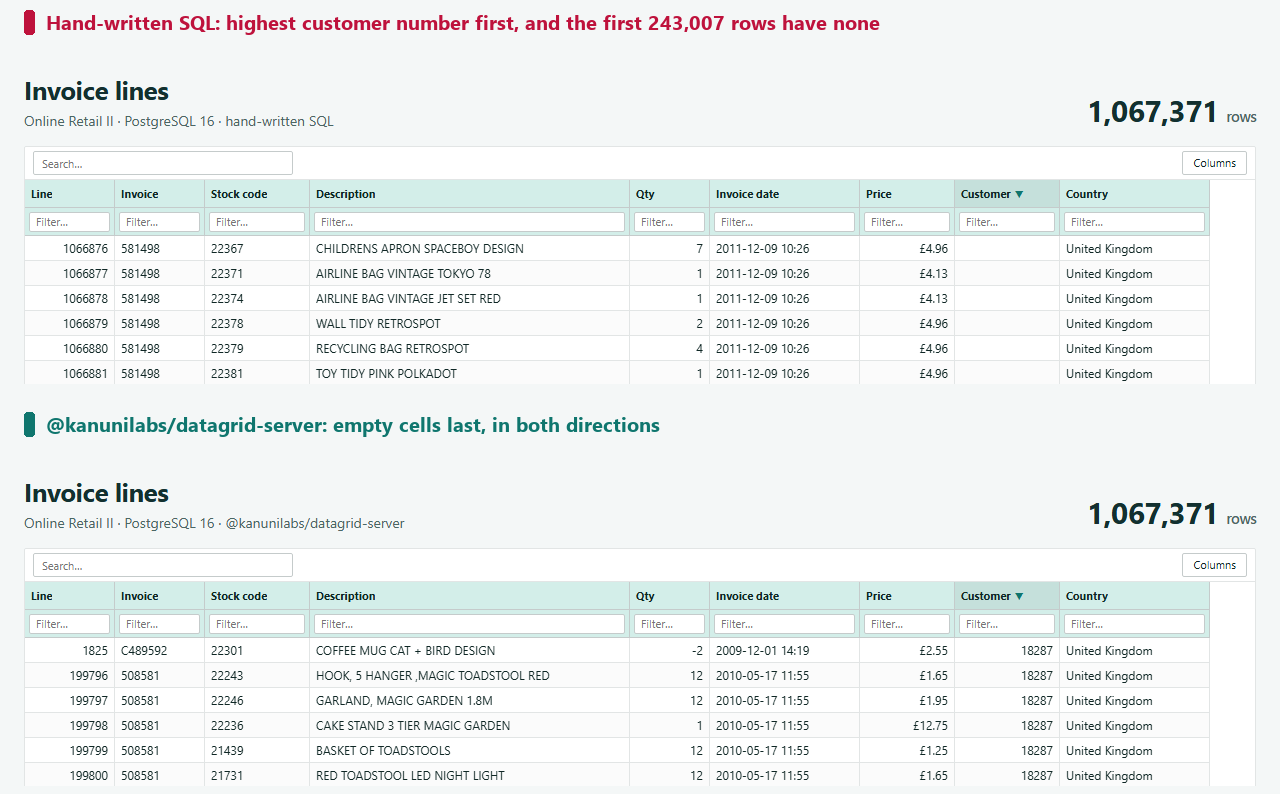
The grid's own sort puts empty values last in both directions. The package does the same on all four databases it supports.
4. Search: capital letters and wildcards
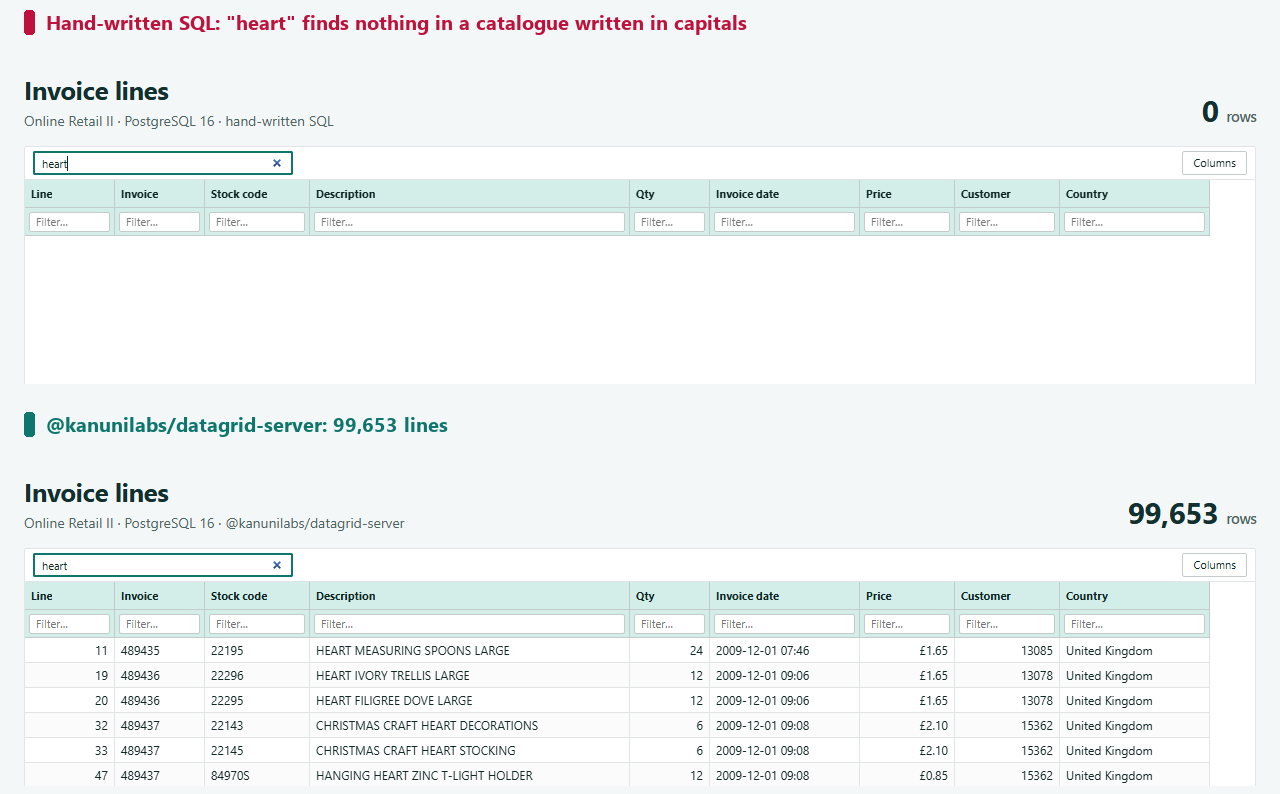
Type "heart" into the search box. The shop's catalogue is written in capital letters ("HEART OF WICKER SMALL"), and LIKE is case-sensitive in PostgreSQL, so the hand-written endpoint finds nothing. The package finds 99,653 lines:
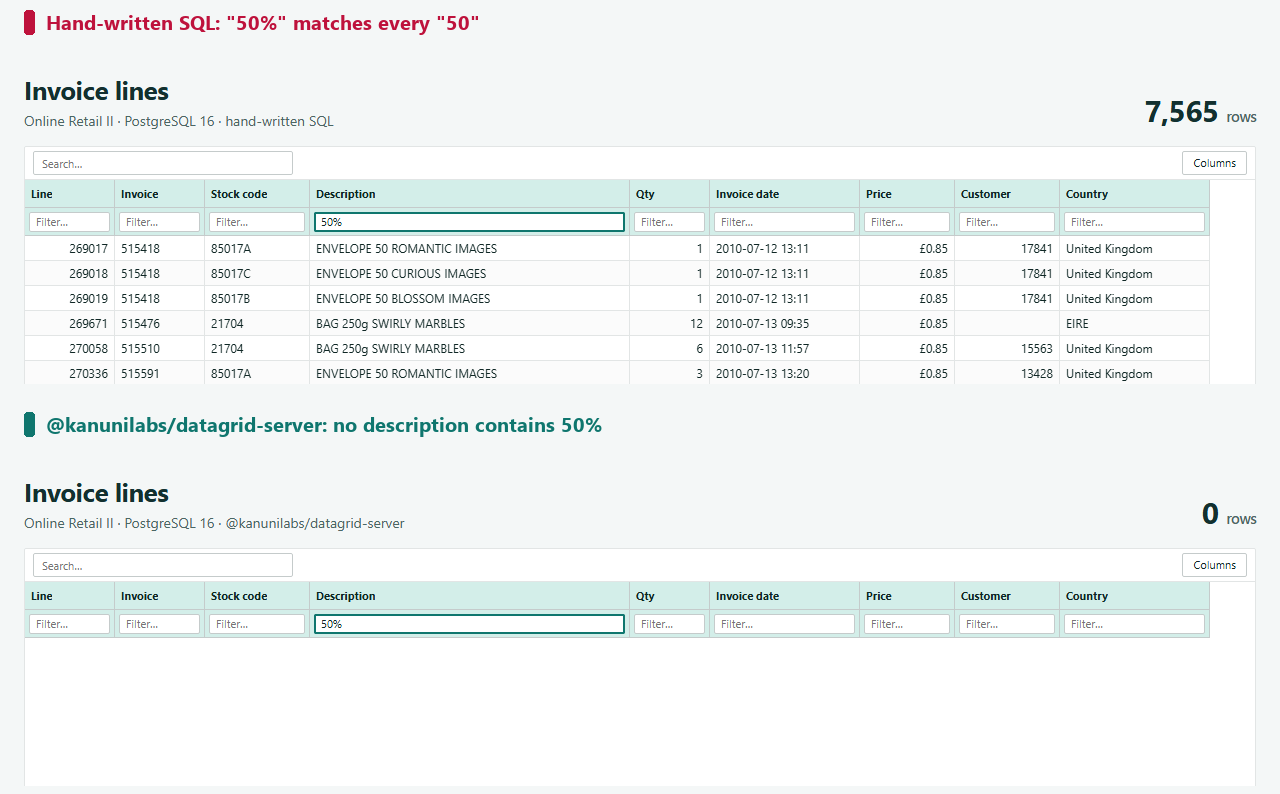
Search for "50%" in the description column and the opposite happens: % is a wildcard in LIKE, so the endpoint returns 7,565 lines containing "50", such as "SET OF THREE 50'S GIFT WRAPS", and none of them contains "50%". The package escapes % and _, and compares text without case. For contains, it also treats the Turkish dotted and dotless i as the same letter, the same way the grid does in the browser.
5. The sort direction is SQL too
The endpoint above at least looks column ids up in a map (COL[...]), but it pastes s.direction into the query as it arrives. A request whose direction is asc, (SELECT 1 FROM pg_sleep(2)) made the database wait two seconds before answering (2,190 ms measured). Any expression can go where that pg_sleep is. Bound parameters protect values, not the parts of the query that are built as text.
The package treats the column map as its whitelist. A request naming any other column, such as price; DROP TABLE invoices, is refused with a 400 and the message Unknown column "price; DROP TABLE invoices" in sort.. The direction gets the same treatment: anything other than asc or desc is a 400 (Unknown sort direction "asc, (SELECT 1 FROM pg_sleep(2))" — use "asc" or "desc".), and neither is ever copied into the query.
The same endpoint, with the package
import { createSqlLoader, SqlRequestError } from '@kanunilabs/datagrid-server';

const invoices = createSqlLoader({
  dialect: 'postgres', // 'mysql' | 'sqlite' | 'mssql'
  from: 'invoices',
  key: 'id',
  columns: {
    // nullable: false = NOT NULL in the table, so the SQL needs no NULL handling for it
    id: { type: 'number', nullable: false },
    invoice: { type: 'string', nullable: false },
    stockCode: { sql: 'stock_code', type: 'string', nullable: false },
    description: 'string',
    quantity: { type: 'number', nullable: false },
    invoiceDate: { sql: 'invoice_date', type: 'date', nullable: false },
    price: { type: 'number', nullable: false },
    customerId: { sql: 'customer_id', type: 'number', searchable: false },
    country: { type: 'string', nullable: false },
  },
  query: (sql, params) => pool.query(sql, params).then((r) => r.rows),
});

app.get('/api/invoices', async (req, res) => {
  try {
    res.json(await invoices.handle(req.query));
  } catch (e) {
    res.status(e instanceof SqlRequestError ? 400 : 500).json({ error: String(e) });
  }
});
It has no dependencies and brings no database driver: you pass the function that runs a query. It answers the rows, the total that sizes the scrollbar, footer totals, and the distinct values for the header filter's checklist (the distinctValues: true in the page code above). The package's tests run a list of filters and searches, the edge cases above among them, through the grid's in-browser engine and through a real SQLite database, and compare the rows.
What it costs, and the indexes that pay it back
Getting those cases right makes some of the SQL longer, and longer SQL can stop using your indexes. To compare text without case, both sides of an = go through LOWER(REPLACE(...)), and a plain index on country cannot answer that expression, so PostgreSQL reads the whole table. Sorting stays cheap: on PostgreSQL the package puts empty values last with NULLS LAST, and for a column marked nullable: false it writes a plain ORDER BY invoice_date DESC, id, which the existing index on invoice_date serves. Search needs a different kind of index: LIKE '%heart%' cannot use an ordinary one at all, whoever writes the query.
These are the times for one block of 100 rows plus the count, as the grid asks for it. Each is the median of seven runs on 1,067,371 rows, with the config above. Compare the package's two columns with each other more than with the first: the hand-written endpoint runs its page and count one after the other and searches two columns, while the package runs them side by side and searches four.
| Request | Hand-written | Package, plain indexes | Package, matching indexes |
|---|---|---|---|
| First block, no sort | 48 ms | 45 ms | 57 ms |
| First block, newest first | 52 ms | 45 ms | 56 ms |
| Block at row 500,000, newest first | 91 ms | 116 ms | 91 ms |
| Block at row 1,000,000, newest first | 163 ms | 228 ms | 207 ms |
| Country = France | 1 ms | 105 ms | 5 ms |
| Search "heart" | 198 ms (0 rows, wrong) | 472 ms | 100 ms |
Differences of 10 or 20 ms between runs are noise on a laptop; the rows that matter are the last two. The matching indexes come from the package itself. indexStatements takes the same object you pass to createSqlLoader and writes the CREATE INDEX statements for the expressions it queries with, for your migration:
import { indexStatements } from '@kanunilabs/datagrid-server';

for (const sql of indexStatements(config, { columns: ['country', 'invoiceDate'] })) await pool.query(sql);
For this config it wrote five: one on the folded country for =, and one per sort direction for each column, ending in id. Search needs a trigram index per searchable column, which you write yourself:
CREATE EXTENSION IF NOT EXISTS pg_trgm;
CREATE INDEX ON invoices USING gin
  ((LOWER(REPLACE(REPLACE(REPLACE(COALESCE(description, ''), 'İ', 'i'), 'ı', 'i'), 'I', 'i'))) gin_trgm_ops);
An expression index is used only when the query contains the same expression: the same functions with the same literals, in the same order. buildSqlPlan(request, config) returns the statements a request would run without running them; the expression to copy is in its page.sql.
These indexes are not small, so pass only the columns users really filter or sort by. Here the five from indexStatements came to 153 MB and the four trigram indexes to 101 MB, next to a table of 123 MB, and building all nine took 19 seconds. The country = index alone is 7 MB and does nearly all of the work in its row. The four sort indexes are most of the 153 MB and bought little on this table, because the plain index on invoice_date already served the sort; they matter on columns that have no index yet.
Limits
- Deep pages still cost more.
OFFSET 1000000makes the database step over a million rows: even with the matching index, the block at row 1,000,000 took 207 ms against 56 ms for the first. A grid lets the user drag the scrollbar to any row, so it cannot use keyset paging, which only works from one page to the next. - Every block is counted. The total sizes the scrollbar, so the package runs
COUNT(*)with the same filters next to every block it serves. Run on their own, the count of this table took about 45 ms and the first page about 1 ms, so the count is nearly all of a block's time when nothing is filtered. - Some things are the database's to decide: the sort order of text (your collation), and on SQLite, upper and lower case beyond ASCII.
- Free and paid. The server package, loading from the server, sorting, filtering, search, distinct values and footer totals are all free. Grouping, a tree and exporting the whole result from the server need the paid grid on the page; the server side is the same package.
Try it
The server-side data guide has the full contract and the package's options for PostgreSQL, MySQL, SQLite and SQL Server. The sales dashboard demo loads the same 1,067,371 lines into the browser instead, if you want to compare.
Data: Online Retail II, UCI Machine Learning Repository (Chen, 2019), CC BY 4.0.
Disclosure: this article was drafted with AI assistance. Every number in it was measured against our packages (@kanunilabs/datagrid-react 1.8.0, @kanunilabs/datagrid-server 1.1.0), PostgreSQL 16 and the published dataset in October 2026.